Title from Broken Social Scene Presents: Brendan Canning, great album as always.
Sorry about the lack of updates. I tend to make posts more of a production than they probably should be so I decided to try the next best thing: Twitter. As you can now see in the sidebar, I have a Twitter feed which I promise to update quite a bit more than this blog. It won't be replacing this blog, just supplementing it. Oh, and please feel free to follow my Twitter account if you want updates to be a little more instant.
Anyway, I wasn't planning to write a massive post or put up pictures but I'll share a quick story. The HOA just aerated the lawn behind the house and me and Gavin went outside to take out the garbage. Gavin took about five steps outside and stopped dead in his tracks and exclaimed, "There's poops everywhere!" I explained that it wasn't in fact dog droppings and even picked one up to demonstrate but I'm not sure he fully believed me because he was walking very cautiously to the dumpster. I then showed him the holes where they came from and he finally realized what it was but the look on his face when he first saw it was priceless.
Showing posts with label technology. Show all posts
Showing posts with label technology. Show all posts
Sunday, April 5, 2009


Tuesday, October 21, 2008
Yeah (Pretentious Version)
Title from LCD Soundsystem.
Whenever you load up Firefox (hooray for plug-ins!) or Internet Explorer (but why?) or Safari (I'm sorry) or whatever (Chrome someday?), what website do you go to first? Chances are you have a ton of web sites you have tied to bookmarks. You would then access these through a bookmark sidebar or you've found out how to launch multiple bookmarks through Firefox. I used to do that but now I only click on one button:
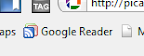
Now, I don't want to be a cheerleader for Google as I usually jump onto whatever works best for me despite who makes it, but I LOVE my Google Reader. So what is a Google Reader anyway? Well, the proper term for it is an RSS feed aggregator. If you're still lost, let's talk about what an RSS feed actually is.
RSS stands for Really Simple Syndication and that's really what it is. It's analagous to subscribing to a magazine (well, a free one anyway). If you want to subscribe to the magazine, you'd send a registration form to the magazine company and within 4-6 weeks you'd get your first magazine in the mail (instead of checking for a new issue at the store every month). Well, with an RSS feed, you can subscribe to a website and have the website tell YOU when it has been updated instead of checking the website every day to see if there are updates.
So let's say you like to follow a blog or website whose updates are kind of erratic (kind of like this blog, see where I'm going with this?). All you have to do is subscribe to the RSS feed and then when a new post is made, your RSS feed aggregator program will let you know. How cool is that!?
Now, I'm not saying that you would HAVE to use Google Reader (some people swear by other aggregators), but if you were so inclined to use it, here's how you get started.
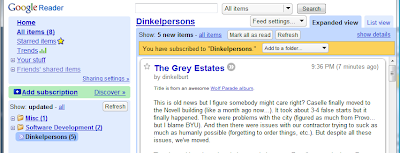
You'll see that you can add an option to add to a folder which you can see I've already made a few but it's up to you if you want to create folders and what not. You'll also want to take a minute and view the settings for the reader, especially the Scroll Tracking as it's not for everybody.
So there you have it, convenience at its best. If you have any questions, suggestions or comments, please feel free to comment on this post :-).
Whenever you load up Firefox (hooray for plug-ins!) or Internet Explorer (but why?) or Safari (I'm sorry) or whatever (Chrome someday?), what website do you go to first? Chances are you have a ton of web sites you have tied to bookmarks. You would then access these through a bookmark sidebar or you've found out how to launch multiple bookmarks through Firefox. I used to do that but now I only click on one button:
Now, I don't want to be a cheerleader for Google as I usually jump onto whatever works best for me despite who makes it, but I LOVE my Google Reader. So what is a Google Reader anyway? Well, the proper term for it is an RSS feed aggregator. If you're still lost, let's talk about what an RSS feed actually is.
RSS stands for Really Simple Syndication and that's really what it is. It's analagous to subscribing to a magazine (well, a free one anyway). If you want to subscribe to the magazine, you'd send a registration form to the magazine company and within 4-6 weeks you'd get your first magazine in the mail (instead of checking for a new issue at the store every month). Well, with an RSS feed, you can subscribe to a website and have the website tell YOU when it has been updated instead of checking the website every day to see if there are updates.
So let's say you like to follow a blog or website whose updates are kind of erratic (kind of like this blog, see where I'm going with this?). All you have to do is subscribe to the RSS feed and then when a new post is made, your RSS feed aggregator program will let you know. How cool is that!?
Now, I'm not saying that you would HAVE to use Google Reader (some people swear by other aggregators), but if you were so inclined to use it, here's how you get started.
- Go to http://www.google.com/reader
- If you have a Gmail account, just put your credentials for it in and follow any instructions. If you don't have a Gmail account, I recommend getting one but if you really don't want to, just create an account using whatever email you prefer and go through the set up.
- Now that you have an account, come back to my blog for a test. You can either click the big fatty button at the top that says Posts RSS, or go to the Subscribe to thing on the right and click on Posts, then Add to Google. You'll get a page asking what to add the feed to but I always choose the right option (Google Reader).
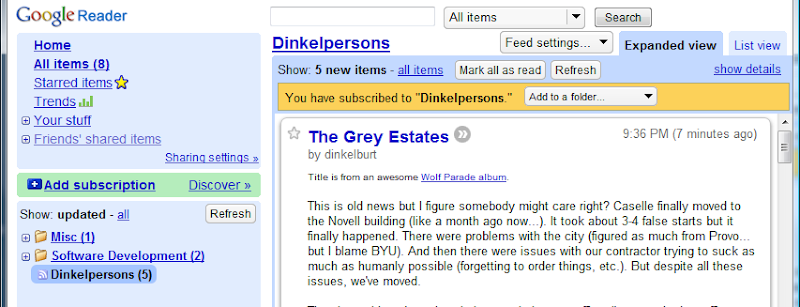
You'll see that you can add an option to add to a folder which you can see I've already made a few but it's up to you if you want to create folders and what not. You'll also want to take a minute and view the settings for the reader, especially the Scroll Tracking as it's not for everybody.
So there you have it, convenience at its best. If you have any questions, suggestions or comments, please feel free to comment on this post :-).
Subscribe to:
Posts (Atom)